
Table of Contents
- Introduction: The Real Challenges Inside Manufacturing
- Why Manufacturers Struggle Without an ERP System
- How Microsoft Dynamics 365 Business Central Solves These Problems
- Key Manufacturing Features in Business Central
- Step-by-Step Business Central Implementation Approach
- Real-Life Use Case: A Plastics Components Manufacturer
- Key Benefits of Business Central for Manufacturing Companies
- Common Mistakes to Avoid During Business Central Implementation
- Related Services and Industry Playbooks
- Conclusion
- Ready to Implement Business Central for Manufacturing
Manufacturing ERP insights. A practical guide for manufacturing business owners and operations leaders.
Introduction: The Real Challenges Inside Manufacturing
Manufacturing is one of the most complex industries to run. Whether you produce auto parts, packaged food, industrial equipment, or garments, day-to-day operations involve hundreds of moving parts that must come together perfectly. One small disruption — a delayed raw material, a miscounted inventory item, or an unplanned machine breakdown — can cascade into lost orders, unhappy customers, and serious revenue damage.
Here is the hard truth: most manufacturing businesses in the growth phase are still managing these complexities with a patchwork of tools — Excel spreadsheets, standalone accounting software, paper-based records, and phone calls. That approach worked in the early days. But as volumes grow, product lines expand, and customer expectations rise, that patchwork begins to break down.
Let us look at the most common pain points we hear from manufacturing business owners every day:
- Inventory mismatch — your system says you have 500 units of raw material, but the warehouse team finds only 320. Production stops, and the blame game begins.
- Production delays — without a real-time view of machine capacity and workforce availability, production schedules are built on guesswork. Delays become the norm.
- Manual processes — order confirmations, purchase approvals, quality checks, and cost calculations are all done manually, creating bottlenecks and increasing error rates.
- Lack of visibility — management cannot see what is happening on the shop floor in real time. Decisions are made on last week's data, not today's reality.
- Cost overruns — without accurate tracking of material usage and labor hours against each production order, manufacturers often discover they are losing money on jobs — but only after the fact.
Why Manufacturers Struggle Without an ERP System
Many manufacturers we work with are not failing because of poor products or bad people. They are struggling because their systems do not talk to each other. Data lives in different places, departments operate in silos, and nobody has a complete picture of the business.
Here are the four biggest operational problems this creates:
Disconnected Systems
Your finance team uses one software. Your inventory team uses a spreadsheet. Your production supervisor tracks orders on a whiteboard. When these systems do not connect, you spend more time reconciling data than actually running the business. Information shared via email or messaging is never reliable, and decisions are made on incomplete data.
Poor Planning
Without integrated Material Requirement Planning (MRP), production managers manually calculate what materials are needed, when to order, and how much buffer stock to maintain. This leads to two problems: either you overstock (wasting working capital) or you understock (stopping production). Neither is acceptable in a competitive market.
Data Errors and Duplication
When data is entered manually in multiple systems, errors multiply. A wrong unit of measure in a purchase order, an incorrect quantity in a production entry, or a missed update to a BOM (Bill of Materials) can lead to scrap, rework, or even a failed product batch. In regulated industries, this can also create compliance risks.
Delayed Decisions
Without real-time dashboards, a manufacturing director typically waits 3 to 5 days to get a consolidated report from different department heads. By the time they react to a problem — say, a critical component running out of stock — the production line may already have been idle for two days. In manufacturing, delayed decisions are expensive decisions.
How Microsoft Dynamics 365 Business Central Solves These Problems
Microsoft Dynamics 365 Business Central is a cloud-based ERP system designed for small to mid-sized businesses, including manufacturers. It brings every department — finance, production, inventory, purchasing, and sales — into a single, connected platform. Think of it as the central nervous system of your manufacturing operation.
Here is how Business Central directly addresses the challenges manufacturers face:
- Real-time data: Every transaction — a goods receipt, a production output, a machine downtime log — updates the system instantly. Managers see live dashboards, not stale reports.
- Automation: Routine tasks like purchase order generation, inventory replenishment alerts, and production scheduling updates happen automatically based on predefined rules.
- Full integration: Finance, procurement, warehouse, and production all work from the same data. When a production order is released, it automatically checks material availability and capacity.
- Centralized system: One login, one database, one version of the truth. No more reconciling data between systems or chasing people for updates via email.
Beyond these fundamentals, Business Central is deeply configurable for manufacturing-specific workflows. Whether you run discrete manufacturing, process manufacturing, or a hybrid model — the platform can be shaped to match your operations, not the other way around.
Key Manufacturing Features in Business Central
Let us go through the core manufacturing modules in Business Central, with real examples of how they work in practice.
Production Orders
A Production Order in Business Central is the official document that kicks off manufacturing for a specific product. It captures what to make, how many units, by which date, using what materials and machines.
Bill of Materials (BOM)
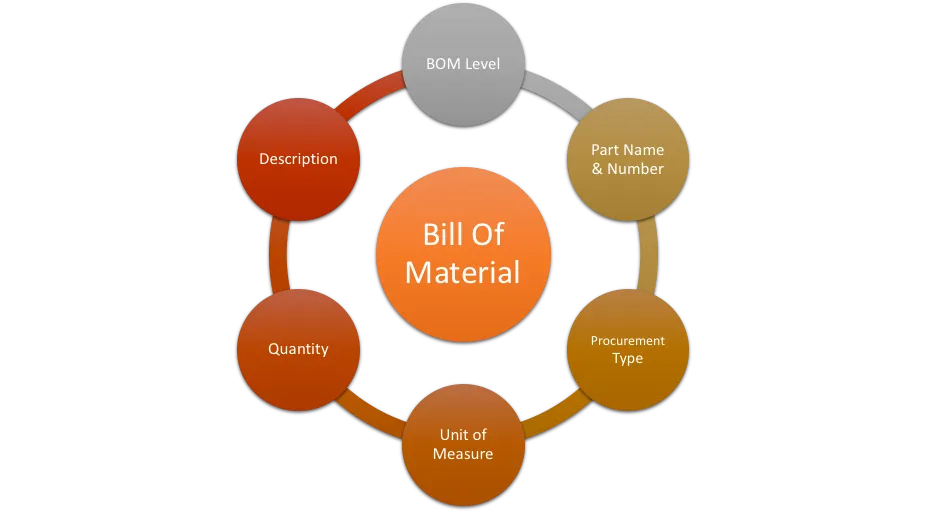
The BOM is the recipe for your product. It lists every component, sub-assembly, and raw material required to produce one unit. In Business Central, BOMs can have multiple levels — a finished product contains sub-assemblies, which themselves contain individual components.
If a design change occurs — say a substitute component is approved — updating the BOM in Business Central automatically reflects the change in all future production orders. No more outdated paper BOMs on the shop floor causing quality issues.
Routing
Routing defines the sequence of manufacturing operations required to complete a product. Each step specifies which work center or machine is used, the expected setup time, and the run time per unit.
Material Requirement Planning (MRP)
MRP is arguably the most powerful planning tool in a manufacturing ERP. In Business Central, the MRP engine analyzes your sales demand, existing production orders, current inventory levels, supplier lead times, and reorder points — and generates a recommended purchasing and production plan.
Instead of your procurement manager manually checking 50 items every Monday morning, Business Central does it in seconds and produces a prioritized action list: what to order, how much, and when to place the order so production is never delayed.
Capacity Planning
Knowing you have a production order is one thing. Knowing whether your machines and workforce can actually execute it is another. Business Central's capacity planning feature lets you see the load on each work center across the planning horizon.
If your laser cutter is booked to 110% capacity next week, Business Central flags this immediately so you can either adjust the schedule, outsource the excess, or negotiate delivery timelines with the customer — before it becomes a crisis.
Inventory Management
Business Central provides multi-location inventory management with bin-level tracking. You can see stock across multiple warehouses, track items by serial number or lot number, manage expiry dates for perishable materials, and automate replenishment based on reorder point policies.
Step-by-Step Business Central Implementation Approach
A successful Business Central implementation in a manufacturing company does not happen by accident. It follows a structured process. Here is how a professional implementation typically unfolds:
- Requirement gathering: The discovery phase. The implementation team spends time with your key users — production managers, store keepers, finance staff, and management — to understand exactly how your business works today. Workflows are documented, gaps identified, and what Business Central needs to do for you is defined. Poor requirement gathering is the number one reason ERP projects fail.
- Data migration: Your current data — items, customers, vendors, open orders, inventory balances, and financial history — needs to be cleaned and migrated into Business Central. Dirty or incomplete data imported into the new system will cause the same problems you had before, just in a more expensive system. Cleanse your data first, then migrate.
- System configuration: Business Central is configured to match your manufacturing setup — work centers, machine capacities, BOM structures, routing sequences, costing methods, approval workflows, and reporting requirements. This is where the system starts to feel like it was built for your business.
- Customization (if required): Standard Business Central covers 80–90% of most manufacturing needs. For the remaining gaps — industry-specific reports, custom quality forms, or integrations with production machines or third-party logistics platforms — targeted customization is developed. The golden rule: customize only what you truly cannot live without. Over-customization increases cost and complicates future upgrades.
- User Acceptance Testing (UAT): Before go-live, your key users test every major workflow in Business Central using real scenarios from your business. They create production orders, raise purchase requisitions, process inventory transactions, and generate financial reports — and compare results to expected outputs. Issues found during testing are fixed here, not after go-live.
- User training: Technology is only as good as the people using it. Role-based training is delivered to every user — from the finance manager who needs to run costing reports, to the storekeeper who books goods receipts, to the production planner who manages MRP. Training is done in the actual configured system, using real examples from your own business.
- Go-live: Go-live day is planned carefully — often over a weekend or a slow production period. The old system is frozen, final data is migrated, and Business Central goes live. The implementation team is on-site (or available remotely) to support users through the first day and first week of real operations.
- Post-go-live support and optimization: The first 30–90 days after go-live are critical. Users are still learning, edge cases appear, and reporting needs evolve. A good implementation partner stays engaged — resolving issues quickly, training new users, and gradually optimizing the system as your team builds confidence.
Real-Life Use Case: A Plastics Components Manufacturer
Let us look at a practical example based on a composite of real client situations.
Before implementing Dynamics 365 Business Central, the company was managing operations across three separate systems: a legacy accounting package, an Excel-based production tracker maintained by one experienced planner, and a manual bin-card system for inventory. When that planner was on leave, production planning effectively stopped.
| Before ERP | After Business Central |
|---|---|
| Production planning done manually in Excel — one person dependent | MRP engine in Business Central auto-generates purchase and production plans |
| Inventory counted monthly — inaccuracies discovered weeks later | Real-time inventory with bin-level tracking — discrepancies caught within hours |
| Cost per production order calculated at month-end, often wrong | Accurate cost per order calculated live — variances visible instantly |
| Customer delivery promises made based on guesswork | Sales team checks live capacity and inventory before committing delivery dates |
| Management reports took 5 days to compile manually | One-click dashboards give live financial and operational data anytime |
| Quality hold on a material lot affected entire factory | Lot traceability in BC isolates affected orders — rest of factory unaffected |
Within six months of go-live, the company reported a 23% reduction in raw material holding costs, a 31% improvement in on-time delivery performance, and the ability to process 40% more orders without adding headcount — because the system was doing the administrative heavy lifting.
Key Benefits of Business Central for Manufacturing Companies
When Business Central is implemented correctly in a manufacturing environment, the results are tangible and measurable. Here is what manufacturers consistently experience:
- Improved operational efficiency: Automated workflows eliminate manual steps across procurement, production, and inventory. Your team focuses on value-added work, not administrative chasing.
- Tighter cost control: Real-time costing on every production order means you know your actual margin on every product — not just at month-end. Identify cost overruns before they become losses.
- Better decision-making: Executives and managers access live dashboards showing production output, inventory value, customer order status, and financial performance — all in one screen.
- Real-time visibility: From the CEO to the shop floor supervisor, everyone works from the same live data. Miscommunication between departments drops dramatically.
- Optimized inventory levels: MRP ensures you carry exactly what you need — reducing both excess stock (which ties up cash) and stockouts (which stop production).
- Scalability: As your business grows — new product lines, new factories, new geographies — Business Central scales with you. You are not limited by the size of your ERP.
Common Mistakes to Avoid During Business Central Implementation
Even the best ERP system can deliver poor results if the implementation is handled incorrectly. Here are four mistakes that derail manufacturing ERP projects most often — and how to avoid them:
Mistake 1: Poor Planning
Some companies rush into implementation without clearly defining their requirements or assigning internal project ownership. Every successful implementation needs a dedicated internal project champion — someone with authority who can make decisions, coordinate departments, and keep the project on track. Without this, the project drifts, timelines slip, and costs spiral.
Mistake 2: Migrating Dirty Data
Garbage in, garbage out. If your item master has duplicates, your BOMs have errors, or your customer records are incomplete — all of those problems will follow you into Business Central. Invest time before implementation to clean, deduplicate, and validate your data. This unglamorous work is the single most important thing you can do for a smooth go-live.
Mistake 3: Inadequate User Training
Many ERP projects succeed technically but fail operationally because users were not trained properly. A storekeeper who does not understand how to process a goods receipt in Business Central will find a workaround — and that workaround breaks your data integrity. Training must be role-specific, hands-on, and conducted in the actual system before go-live.
Mistake 4: Over-Customization
Business Central is a mature, feature-rich platform. Before requesting a customization, always ask: is there a standard way to do this in Business Central? Can we change our process slightly to use a standard feature? Every customization adds cost today and complexity tomorrow — especially during system upgrades. Build only what truly serves a unique business need.
Related Services and Industry Playbooks
- Business Central implementation services for a structured ERP rollout.
- Business Central for Manufacturing for production, inventory, and shop-floor alignment.
- Contact Gigatorb to discuss manufacturing requirements and a phased implementation plan.
Conclusion
Manufacturing success depends on visibility, planning discipline, and one reliable version of the truth across finance, inventory, and production. Microsoft Dynamics 365 Business Central gives growing manufacturers that foundation — when requirements are clear, data is clean, and users are trained for their roles.
If you are evaluating ERP for manufacturing, prioritize requirement gathering, migration quality, and a realistic customization scope. Those choices determine whether your implementation becomes a lasting advantage or an expensive reset.
Ready to Implement Business Central for Manufacturing
Gigatorb provides end-to-end Dynamics 365 Business Central services from discovery and configuration to go-live and post-go-live optimization.
- Email: info@gigatorb.com
- Phone: +91 98933 39105
- Website: www.gigatorb.com
© 2026 Gigatorb Software Pvt Ltd | Microsoft Dynamics 365 Business Central Partner | Indore, India
Ready to Transform Your ERP?
Connect with Gigatorb Software Pvt Ltd for a free consultation.
Book a Free Consultation